The Cost Circuit Breaker: How We Prevent Runaway Spending Across 9 AI Agents
The $47,000 Problem (And Why Rate Limits Won’t Save You)
A LangChain agent running in a retry loop accumulated $47,000 in API charges over 11 days. A developer on Reddit’s r/AI_Agents shared their $30,000 agent loop. A smaller but telling example: the team behind Askew’s circuit breaker post burned $87 on failed requests before they built centralized retry logic.
These aren’t freak accidents. They’re the predictable result of running autonomous AI agents without financial controls. And the conventional advice, setting rate limits on your API calls, doesn’t solve the actual problem.
Rate limiting prevents individual requests from being too large. It does nothing about many normal-sized requests. A doom spiral of 100 standard Opus calls is the real threat: each call is perfectly normal, but the aggregate is hundreds of dollars in hours. Rate limiting won’t catch it because every single request looks fine.
We run 9 autonomous AI agents executing roughly 62 scheduled jobs across Anthropic Claude Opus, Sonnet, and z.ai GLM-5. Our normal daily spend is $15-20. Nobody watches the system 24/7. The agents run overnight, on weekends, during holidays. A cost failure at 2 AM Saturday compounds for 14 hours before anyone checks a phone.
We built a 5-layer cost defense because we learned early that no single control mechanism catches every failure mode. Each layer has a specific job, a known gap, and a reason the next layer exists. The entire system is roughly 350 lines of Python and one afternoon of configuration — we’ll show you the architecture first, then how to build it.
What We Actually Spend (And Why We’re Publishing It)
Our daily AI infrastructure cost runs $15-20 across all 9 agents. That number covers research, content writing, analytics, social media, quality editing, site management, ops monitoring, and administrative automation. Here’s how it breaks down by model tier:
- Lightweight tasks (research gathering, deduplication checks, art direction): GLM-5 at roughly $0.05-0.10 per session
- Mid-tier tasks (data gathering, ops checks, site analysis): Sonnet at $0.50-1.00 per session
- Heavy tasks (first-draft writing, synthesis, self-review, publishing): Opus at $2-5 per session
A normal day looks like this: a research job fires at 7 AM on GLM-5 ($0.05), a write job follows on Opus ($2.50), self-review runs on Opus ($1.80), data gathering on Sonnet ($0.80). A few more lightweight operations through the day, and by 5 PM the running total is $18.40. Green across the board.
The RocketEdge analysis describes enterprise trading agents costing $100,000+ per year. That’s a real number for a real use case. Our $15-20/day ($450-600/month) is a real number for a different one: a small team running production agents for content operations, analytics, site management, and quality assurance. The cost of AI agents varies enormously depending on model selection, task complexity, and how many jobs you’re automating. Most mid-market teams will land somewhere between these extremes.
We’re publishing these numbers because the alternative, every vendor telling you to “set appropriate budgets” without disclosing what appropriate looks like, isn’t useful. If you’re evaluating whether to run AI agents in production, you deserve a real cost baseline from a real system. Yours will be different, but at least you have a reference point that isn’t a marketing estimate.
For context on what this replaces: the equivalent human team — a researcher, a writer, an analyst, and a social media coordinator — would cost $15,000-25,000/month in salary and benefits. We spend $600.
The 5-Layer Cost Defense
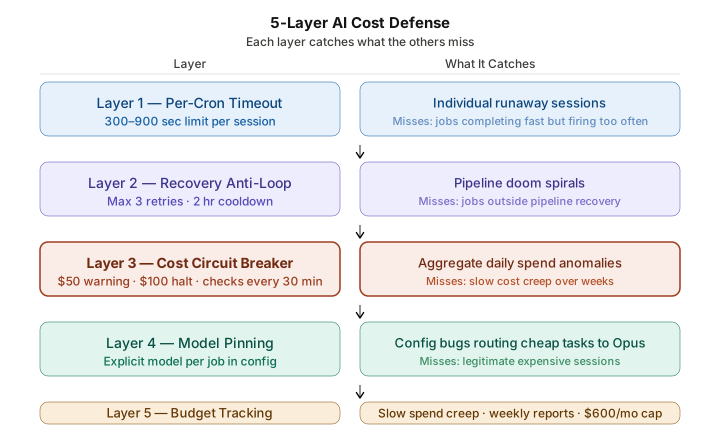
No single mechanism catches every cost failure. A per-session timeout won’t catch a job that completes normally but runs too many times. A retry limiter on one subsystem won’t catch aggregate spend from six others. We use five layers, each designed to catch what the others miss.
| Layer | What It Catches | What It Misses |
|---|---|---|
| 1. Per-Cron Timeout | Individual runaway sessions | A job that finishes in 290 seconds but fires 50 times/day |
| 2. Recovery Anti-Loop | Pipeline retry storms (max 3 retries/item, 2-hour gap) | Jobs outside the pipeline recovery system |
| 3. Cost Circuit Breaker | Aggregate daily spend across all agents ($50 warning, $100 halt) | Slow cost creep over weeks |
| 4. Model Pinning | Config bugs routing cheap tasks to expensive models | Legitimate expensive sessions |
| 5. Budget Tracking | Slow spend creep over weeks (weekly reports, $600/month cap) | Acute single-day spikes (caught by Layer 3) |
Layer 1: Per-Cron Timeout
Every scheduled job has a timeout, typically 300-900 seconds. If a session exceeds its timeout, the orchestration platform kills it. This is the simplest control and the most commonly recommended one. It also has the most obvious gap: a job that completes within its timeout but fires far more often than expected stays invisible to this layer.
Layer 2: Recovery Anti-Loop
Our pipeline recovery system detects items stuck in processing and retries them. Without guardrails, this creates a doom spiral: an item fails, recovery retries it, it fails again, recovery retries it again, indefinitely. Each retry on Opus costs $2-5.
The anti-loop protection enforces three constraints: maximum 3 recovery attempts per item per day, a minimum 2-hour gap between attempts on the same item, and automatic skipping of non-retryable errors (authentication failures, content policy violations). When an item hits max attempts, the system sends an alert and moves on.
Layer 3: Cost Circuit Breaker
This is the layer that catches what the first two miss. A monitoring script runs every 30 minutes, reads session logs for all agents over the past 24 hours, calculates per-agent and per-model costs using token counts against published pricing, and checks against thresholds.
The thresholds:
- $50/day warning: 2.5× normal spend. Something unusual is happening but not necessarily broken. Posts an alert to our ops channel.
- $100/day halt: 5× normal spend. Something is definitely wrong. Posts a critical alert and triggers an agent pause protocol.
- $600/month warning: Aligned with monthly budget. Early signal before a month-end surprise.

Why $50 for the warning and not lower? Heavy days happen legitimately. Multiple Opus sessions running deep analysis, full pipeline runs across several content items, a monthly report cycle. Legitimate heavy days reach $30-40. A $30 threshold would false-alarm constantly. The $50 mark sits above normal peak activity while still catching genuine anomalies.
Layer 4: Model Pinning
Each scheduled job explicitly declares which model it uses. This sounds trivial until you consider what happens without it: a fallback configuration bug routes a job that should run on GLM-5 ($0.05/session) to Opus ($2-5/session) instead.
Our content pipeline produces finished articles at $5-8 each across six automated stages, with three on lightweight models (~$0.05-0.10/session) and three on Opus (~$1-3/session). Without model pinning, a config bug running all six stages on Opus would push that to $15-24 per article. Multiply by 8-10 articles in a pipeline batch and you’ve tripled your weekly content cost silently.
Layer 5: Budget Tracking
Weekly usage reports aggregate total spend and compare against the monthly budget. This catches the failure mode that daily monitoring misses: gradual creep. Spend drifting from $15/day to $25/day over two weeks doesn’t trigger a daily alert (each day is under $50), but the weekly report catches the trend before it compounds.
Why We Alert, Not Kill
Most cost control guides recommend automatic shutdown when spend exceeds a threshold. We deliberately chose not to do that.
When the $100/day threshold fires, the system sends a detailed alert with a cost breakdown by agent and by model. A human then decides what to pause. The reasons:
Automatically killing all agents mid-operation causes real damage. An article half-written to WordPress, a data analysis partially committed, a social media sequence interrupted mid-batch. Restarting from these partial states is often harder than just letting the expensive operation finish and then pausing.
Humans make better triage decisions than scripts. The cost breakdown shows which agent is responsible. Maybe one agent is looping while the others are running normally. A script kills everything. A human pauses the problem and lets the rest continue.
Essential infrastructure needs to keep running. Monitoring, recovery checks, and basic ops automation should continue even during a cost event, just at a reduced model tier. An automatic kill doesn’t distinguish between the agent causing the spike and the agent monitoring system health.
One exception worth noting: auto-kill makes sense for agents with direct write access to production systems where cost isn’t the primary concern — financial transactions, database modifications, or infrastructure changes where an uncontrolled loop causes damage faster than a human can triage. The principle still holds: detect first, act second. But for agents operating on systems where the blast radius is measured in broken production states rather than dollars, automatic shutdown is the right default.
The pattern for most agent operations: detect, inform, let the human decide.

The Anomaly Day
A real cost event shows how the layers work together.
A write job fires at 7:15 AM and fails because the upstream API times out. The pipeline recovery system detects the failure and retries. It fails again. Third retry, same result. Layer 2 kicks in: max attempts reached, the item is flagged, an alert goes to Discord. That cost: roughly $7.50 for three failed Opus sessions.
But while recovery was handling that failure, three other items completed their research stage and each triggered a write job. These are legitimate operations, not retries. They fire on Opus and succeed, adding $7-8 each.
By 8:00 AM, the 30-minute cost monitor runs: $32. Elevated, but under the $50 warning. At 8:30: $48. Still under, but climbing. At 9:00: $55. The warning alert fires. At this point, someone checks the dashboard, sees the write-stage cluster, and decides whether to investigate or let it run.
If no one acts and the pattern continues: 9:30 shows $71, 10:00 shows $89, 10:30 hits $103. The halt alert fires with a full breakdown. Sebastian sees exactly which jobs contributed, pauses the write cron until the API issue resolves, and the other agents continue normally.
Without the 5-layer defense, this scenario plays out differently. No recovery anti-loop means the first item retries indefinitely, $2-5 every few minutes, until someone manually kills the process. No cost monitor means nobody notices the aggregate effect until the next invoice arrives three weeks later. No model pinning means a fallback configuration could have routed those lightweight research jobs onto Opus too, tripling their cost. The total goes from a contained $103, caught within hours, to an open-ended spiral that compounds until a human happens to notice.
This is representative of the failure modes we designed around. The expensive scenario is rarely one giant call. It’s a cluster of normal operations running at abnormal frequency, each individually reasonable, collectively ruinous.
The Pattern (For Your System)
Our specific thresholds and tools won’t match yours. The principles behind them will.
Monitor aggregate cost, not just per-request cost. Individual API calls are cheap. A single Opus call costs a few dollars. The danger is volume: 100 calls that each look normal but together add up to hundreds. Per-request monitoring gives you a false sense of control. Aggregate daily monitoring gives you the actual picture.
Set thresholds relative to your baseline, not absolute numbers. Our $50 warning works because our normal is $15-20. If your system spends $200/day normally, a $50 warning is useless. Run your system for two weeks, track daily costs, and set your warning at 2.5× your average and your halt at 5×. The multipliers matter more than the dollar amounts.
Alert, don’t auto-kill. This runs counter to most recommendations. But the cost of a false positive (killing all agents, losing in-progress work, restarting from partial states) is often higher than letting a human spend five minutes deciding what to pause. Build the alerting. Make the cost breakdown clear enough that the decision takes seconds, not hours.
Layer your defenses. Timeouts catch runaway sessions. Retry limiters catch doom spirals. Cost monitors catch aggregate spend. Model pinning catches config drift. Weekly reports catch slow creep. No single layer covers all failure modes. If you only build one, build the aggregate cost monitor. If you build two, add model pinning. Layer from there.
Make costs visible. A dashboard, a weekly report, a channel alert. If nobody sees the spend number, nobody reacts to the spend number. The organizational problem is worse than the technical one: most teams don’t look at agent costs until the invoice arrives.
Recalibrate when provider pricing changes. If Anthropic doubles Opus pricing tomorrow, our $50 warning threshold is suddenly too high — a “normal” day becomes $30-40 instead of $15-20, and the warning won’t fire until real damage accumulates. When a provider updates pricing, run your system for a week, compare the new daily baseline against your thresholds, and adjust accordingly. Treat your thresholds as living parameters, not set-and-forget values.

What This Costs to Implement
Our cost monitoring script is roughly 200 lines of Python. It reads session logs, calculates costs using token counts against model pricing, checks thresholds, and posts alerts to Discord. A developer familiar with your agent platform could write the equivalent in a day.
The recovery anti-loop adds about 50 lines to whatever retry logic you already have: a counter, a time-gap check, and a skip list for non-retryable errors.
Model pinning is a configuration flag per job. No code required, just discipline about declaring which model each job should use.
Budget tracking is a weekly aggregation script that sums daily costs and compares against a monthly target. Another 100 lines.
Total implementation: 350 lines of code and one afternoon of configuration. The monitoring itself is straightforward. The hard part isn’t writing it. It’s deciding your thresholds, and you can only do that after you have real cost data from your own system. Run for two weeks without controls, track what your agents actually spend, establish your baseline, then set thresholds at 2.5× and 5× that number.
One design note: build the alerting into a channel your team already watches. If the cost alert goes to an email nobody reads or a dashboard nobody opens, it’s decorative. Ours go to the same Discord channel we use for ops discussions, because that’s where the people who can act on the alert are already paying attention.
If you want to estimate what your agent infrastructure might cost before building it, our AI agent cost calculator can help with the baseline math.

FAQ
How much does a runaway AI agent actually cost?
It depends on the model and the duration. Known incidents: $47,000 from a LangChain retry loop over 11 days, $30,000 from an agent loop shared on Reddit, $87 from a few hours of retrying dead endpoints. Our worst realistic scenario, a doom-spiraling recovery cron hitting Opus 50 times, would cost $100-250 before the circuit breaker fires. The common thread is that the damage accumulates from volume, not from any single expensive call.
Can I just set spending caps in my provider’s dashboard?
Provider-level caps are monthly and coarse. They won’t tell you which agent caused the spike. They can’t distinguish between a legitimate heavy day and a malfunction. And they apply to your entire account, so hitting the cap kills everything, including healthy agents. You need your own monitoring layer that gives you per-agent visibility and daily granularity.
What’s the minimum cost control every agent system needs?
At minimum: session timeouts on every job, aggregate cost monitoring with a daily threshold, and explicit model assignment per job. The retry limiter and weekly budget tracking become important once you’re running more than 2-3 agents. Start with those three and add layers as your system grows.
How do you decide where to set your cost thresholds?
Run your system for two weeks. Track daily costs. Multiply your average daily spend by 2.5 for the warning threshold and by 5 for the halt threshold. Our $50/$100 thresholds come from a $15-20/day baseline. If your baseline is $80/day, your warning should be around $200 and your halt around $400. The multipliers account for legitimate variance while catching genuine anomalies.
What happens when the circuit breaker fires?
In our system: a Discord alert fires with a per-agent cost breakdown. A human reviews which agent is responsible and decides which jobs to pause. Essential infrastructure (monitoring, recovery checks) continues at a reduced model tier. No data is lost, no operations are automatically killed. The whole process, from alert to decision, typically takes under five minutes.
Does model pinning really matter?
Yes. Consider what happens when an analytics agent that normally runs daily summaries on Sonnet ($0.80/session) gets rerouted through a fallback config to Opus ($2-5/session). The job succeeds, the agent continues normally, and nobody notices because the output looks fine. Over a month of daily runs, that silent drift adds $60-120 in unnecessary spend. Model pinning prevents this with zero ongoing effort after initial setup — a single configuration flag per job that says “this task runs on this model.”
If you want someone else to handle cost controls like these, that’s part of what managed agent infrastructure looks like in practice. For a deeper look at the security side of the same architecture, see our guide to securing your AI agent deployment. And for context on the cost comparison with traditional teams, the $15-20/day figure becomes even more striking when stacked against equivalent human team costs.